
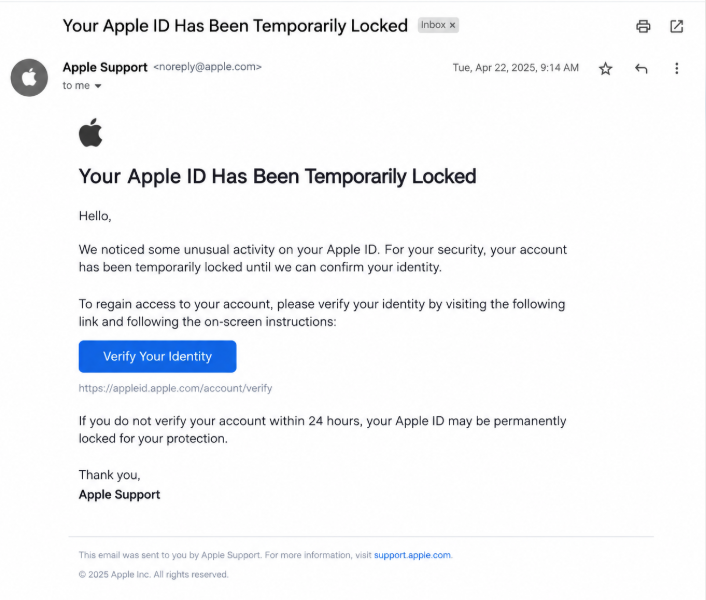
Example of a tech support scam

What are Tech Support Scams?

Tech support scams use fake technical problems or security alerts to trick people into paying for unnecessary services or giving scammers access to their devices.

Scammers may:

  • Pretend to work for Microsoft, Apple, or another trusted company
  • Display fake virus warnings or error messages
  • Demand payment to fix problems that do not exist


Knowing the warning signs can help you protect your devices, accounts, and money.

Legitimate Example

Example illustrating legitimate technical support

A legitimate support service explains the problem, identifies the service provider, and clearly communicates any costs. You can contact the company through its official website and decide whether you want the assistance offered.
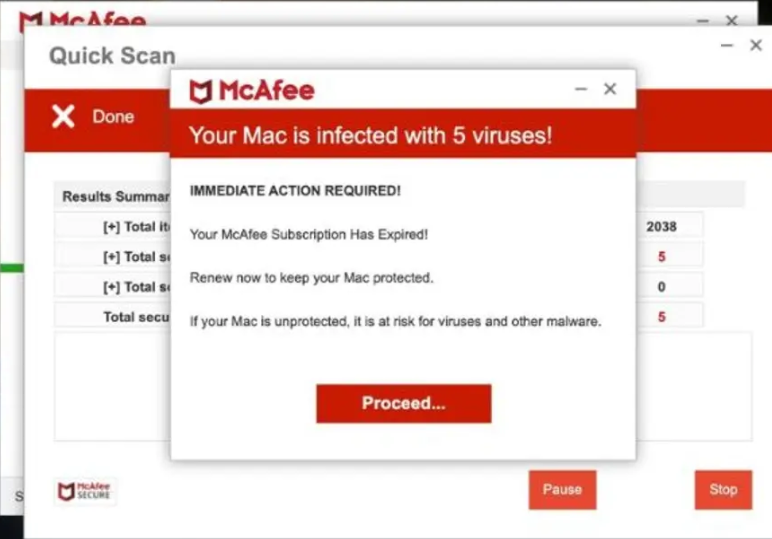
Scam Example

Example illustrating a fake technical support warning

A scammer may display a fake virus warning, claim your computer is infected, and provide a phone number to call immediately. They may then demand payment or ask for remote access to your device.


Remember: Unexpected pop-ups claiming your device is infected should not be trusted automatically.

How Tech Support Scams Work

Scammers create a sense of urgency to make people believe their devices are in danger. They then try to obtain money, personal information, or access to the victim's computer.


1. A Fake Security Warning

You see a pop-up, receive an unexpected call, or get a message claiming your computer has a virus or a serious technical problem.

2. A Request for Access or Payment

The scammer tells you to call a number, install remote-access software, share personal information, or pay for an unnecessary repair.

3. Your Device or Money Is at Risk

The scammer may steal information, access accounts, install unwanted software, or charge you for services you do not need.

Common Spaces

Tech support scams can appear in many places, including:


  • Pop-up warnings and suspicious websites
  • Unexpected phone calls and emails
  • Search results and online advertisements

Common Targets

Anyone using a computer or smartphone can encounter a tech support scam. Scammers may target people who:


  • Are unfamiliar with technical security warnings
  • Need help fixing a device or software problem
  • Are worried about losing files or personal information

However, it's important to know that anyone can fall victim.

What To Do

If a technical warning or support request seems suspicious, take these steps:


  • Do not call numbers displayed in unexpected pop-ups
  • Close the suspicious page without contacting the number
  • Report the scam at reportfraud.ftc.gov
Warning Signs / Red Flags
  • Unexpected security alerts: A pop-up claims your computer is infected and demands immediate action or displays a phone number for assistance.
  • Unsolicited calls: Someone contacts you unexpectedly and claims to have detected a problem with your computer, internet connection, or software.
  • Requests for remote access: A supposed technician asks you to install remote-access software or give them control of your device without a verified reason.
  • Unusual payment demands: The caller demands payment through gift cards, cryptocurrency, wire transfers, or other suspicious methods.
  • Pressure and fear: Someone insists that you must act immediately or risk losing files, having accounts compromised, or damaging your computer.
  • Requests for sensitive information: A supposed technician asks for banking details, passwords, or verification codes that are not necessary for legitimate support.
How to Stay Safe
  • Use official support channels: Visit the manufacturer's official website to find contact information instead of calling numbers shown in unexpected warnings.
  • Do not trust alarming pop-ups: A warning on a webpage does not automatically mean your device is infected. Avoid calling unfamiliar numbers displayed in the message.
  • Never give strangers remote access: Do not let an unexpected caller control your computer or ask you to install software without independently verifying the request.
  • Protect your personal information: Never share passwords, banking details, or one-time verification codes with an unverified technician.
  • Keep your devices updated: Install operating system and security updates through your device's official settings and use reputable security software.
  • Take your time: A legitimate support provider should allow you to verify its identity and consider your options without threatening or pressuring you.
What To Do If You've Been Scammed
  1. End contact with the scammer. Stop the call or conversation. If you gave someone remote access, disconnect the device from the internet and use a separate trusted device to seek help.
  2. Contact your bank or payment provider. If you paid the scammer or shared financial information, explain what happened and ask whether the payment can be stopped or disputed.
  3. Secure your accounts and device. From a trusted device, change exposed passwords, enable multifactor authentication, and check your accounts for suspicious activity. Seek help from a verified technician if remote access was granted.
  4. Report the scam. File a report with the Federal Trade Commission (FTC). If the scam involved online activity, you can also report it to the FBI's Internet Crime Complaint Center.
  5. Save the evidence. Keep phone numbers, emails, payment receipts, messages, and details about any software installed. These may help your bank or investigators.

Being targeted by a tech support scam can happen to anyone. Acting quickly may help protect your accounts, limit financial losses, and prevent further unauthorized access.

Quick Checklist

Frequently Asked Questions

Will Microsoft or Apple call me about a virus?

Be suspicious of unexpected calls claiming that a company has detected a problem with your device. Scammers frequently impersonate well-known technology companies. Do not provide remote access or personal information to an unsolicited caller. Contact the company through its official website if you need assistance.

What should I do if I clicked a fake tech support warning?

If you only opened the warning, close the page and avoid calling any number shown. If you downloaded software, granted remote access, or entered personal information, take additional steps to secure your device and accounts. Change exposed passwords from a trusted device and seek verified technical assistance if needed.

Can a tech support scammer access my bank account?

A scammer who gains remote access may be able to view information on your device or misuse an account that is accessible from it. If you shared banking details or allowed suspicious access, contact your bank immediately, secure your accounts, and review recent transactions for unauthorized activity.

Don't wait until it happens to you.

Start Checking Messages